You can integrate AI into existing software without replacing the applications your business already uses. Whether you operate a CRM, ERP, inventory management system, or custom application, artificial intelligence can often be added through APIs, middleware, or dedicated backend services.
However, successful integration involves more than connecting an AI model. Your software must provide secure data access, validate AI-generated responses, and continue working when an AI service fails.
This guide explains seven practical steps to add AI to your current software, choose the right integration method, handle technical challenges, and measure performance before full deployment.
Can You Integrate AI Into Existing Software Without Rebuilding It?
Yes. Businesses can integrate AI into existing software without rebuilding the entire application, provided the system supports suitable APIs, data connections, or backend modifications.
The approach depends on your software architecture:
- Cloud applications: Often support integration through APIs and webhooks.
- Custom software: Can incorporate AI using backend modules or independent services.
- Legacy applications: May require middleware, secure connectors, or limited modernization.
For example, a CRM can use AI to classify customer inquiries while retaining its existing database and interface.
However, outdated systems with inaccessible data or serious security limitations may require architectural improvements before AI integration becomes practical.
How to Integrate AI Into Existing Software: 7 Practical Steps
The most reliable approach is to start with one clearly defined problem, establish the technical requirements, and test the solution before expanding its use.
Step 1: Assess Your Existing Software Architecture
Before selecting an AI model, understand how your application stores, processes, and exchanges information.
Review the following:
- Available REST APIs, webhooks, and database connections
- Backend programming languages and architecture
- Authentication and authorization systems
- Data storage and hosting infrastructure
- Existing performance and security limitations
For instance, an inventory management platform with documented APIs may support AI-assisted demand forecasting through a separate service.
An older application without APIs might require middleware to exchange information securely.
Practical recommendation: Map the existing data flow and identify where AI can connect without modifying critical business functions.
If the software cannot provide reliable, authorized access to the required data, address that limitation before choosing an AI model.
Step 2: Select One AI Use Case and Define Success
When businesses integrate AI into existing software, attempting to automate multiple processes simultaneously can create unnecessary complexity.
Start with one task that has clear inputs, outputs, and measurable business value.
Suitable examples include:
- Classifying customer support inquiries
- Extracting information from invoices
- Summarizing internal documents
- Searching company knowledge bases
- Identifying unusual transactions
Suppose employees manually categorize incoming support tickets. AI could suggest whether each inquiry concerns billing, technical assistance, or account access.
Before implementation, establish success metrics such as classification accuracy, human correction rate, and average handling time.
Compare these results with your existing workflow. If the AI feature does not demonstrate meaningful improvement, refine it before expanding.
Step 3: Choose the Right AI Model and Integration Method
Your integration approach should depend on software compatibility, data sensitivity, response speed, and available technical resources.
Hosted AI APIs allow applications to use existing models without maintaining model infrastructure.
Self-hosted AI models offer greater deployment control but require additional infrastructure, monitoring, and maintenance.
Built-in AI features may be sufficient when your existing software vendor already provides the required functionality.
For internal document search, retrieval-augmented generation (RAG) can retrieve relevant company information before generating an answer.
However, RAG does not guarantee accuracy. Retrieved documents must be current, relevant, and accessible to the requesting user.
Businesses evaluating broader development options can also review Zensol's custom AI development guide.
Key decision: Choose the simplest method that satisfies your security, functionality, and reliability requirements.
Step 4: Prepare Data and Protect Sensitive Information
Reliable AI integration requires accurate information and well-defined access controls.
Identify the minimum data needed for the selected task. Remove unnecessary personal information, correct inconsistent records, and establish retention rules.
Most importantly, AI must not bypass the permissions already enforced by your application.
For example, a sales employee requesting a customer summary should only receive information they are authorized to access.
Implement these safeguards:
- Authenticate users before processing requests.
- Verify permissions for every protected data retrieval.
- Encrypt sensitive information in transit and at rest.
- Store API credentials in secure backend systems.
- Review AI providers' data-processing and retention policies.
The NIST AI Risk Management Framework provides additional guidance for identifying and managing AI-related risks.
Step 5: Connect AI Through a Secure Backend
To integrate AI into existing software safely, connect the AI service through your application's backend rather than exposing unrestricted AI access directly through the frontend.
A typical architecture follows this workflow:
Existing Application → Authenticated Backend → Authorized Data Retrieval → AI Service → Response Validation → Existing Application
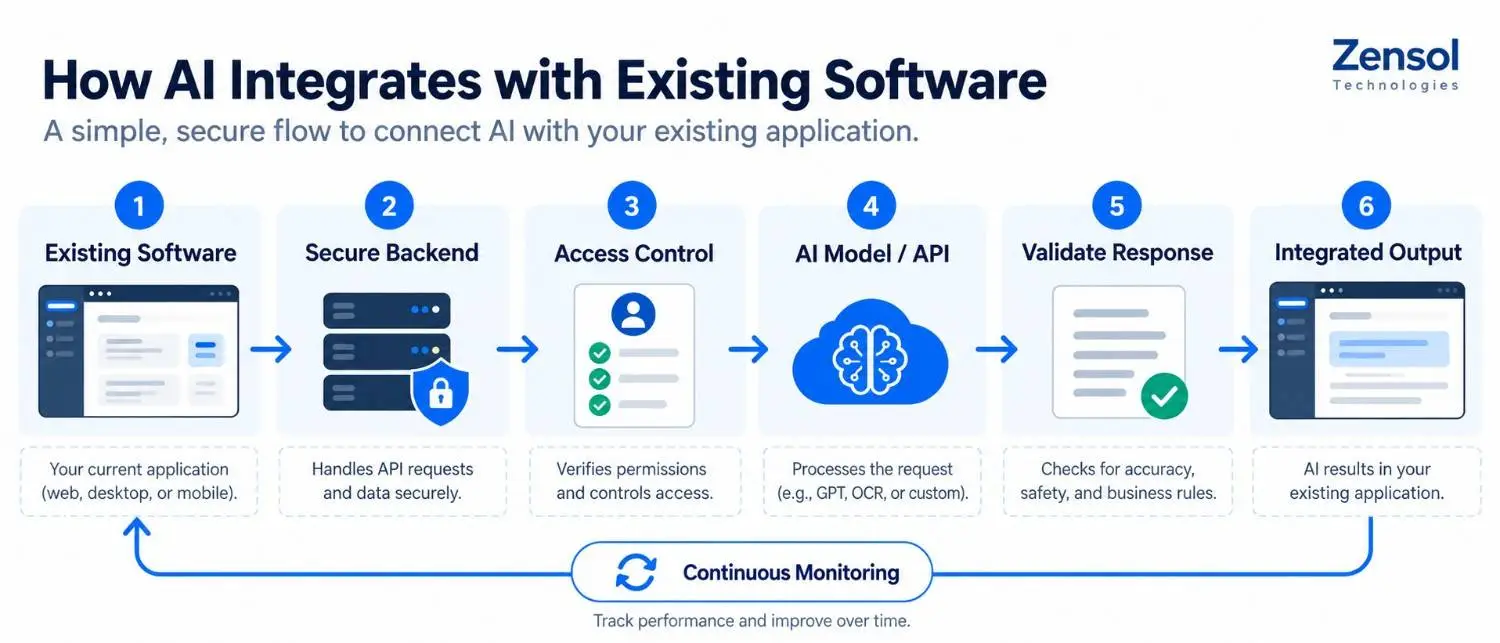
The process works as follows:
- A user requests an AI-assisted action.
- The backend authenticates the user.
- Authorization checks determine which records the user can access.
- The backend sends only necessary information to the AI service.
- The AI returns a structured response.
- The backend validates the response against predefined rules.
- The application displays the suggestion or requests human approval.
For example, a customer support integration might return a ticket category, priority recommendation, and short summary.
Developers should validate field types, permitted values, and referenced record identifiers before saving results.
A valid JSON response does not guarantee that its information is correct.
Important: AI-generated suggestions must never independently grant permission to modify customer records or execute sensitive business actions.
Step 6: Test AI Accuracy, Security, and Reliability
A successful API connection does not mean the AI integration is ready for production.
Test the system using representative inputs, including incomplete records, ambiguous requests, and unusual situations.
Evaluate:
- Accuracy: Compare AI predictions against independently verified answers.
- Security: Test unauthorized data access and malicious inputs.
- Performance: Measure response times under realistic workloads.
- Reliability: Simulate timeouts, API failures, and invalid outputs.
For classification tasks, measure performance separately for different categories. High overall accuracy can hide serious mistakes involving urgent or security-related requests.
Keep evaluation examples separate from those used to configure the model.
The OWASP Top 10 for LLM Applications explains important risks, including prompt injection and improper output handling.
Require human approval before AI recommendations trigger sensitive actions.
Step 7: Deploy Gradually and Monitor Performance
Begin with a controlled pilot involving a small group of users.
Monitor AI accuracy, response times, correction rates, operating costs, and service failures.
Configure rate limits, usage alerts, and fallback procedures.
For example, if the AI service becomes unavailable, support tickets should return to manual classification rather than interrupting customer service.
Maintain a rollback option that disables the AI feature without affecting the original application.
When you integrate AI into existing software, expand deployment only after performance consistently meets your agreed requirements.
How to Choose the Right AI Integration Method
Not every application needs the same integration architecture.
| Integration Method | Best For | Main Advantage | Key Limitation |
|---|---|---|---|
| AI APIs | Modern applications with secure backend access | Access to established AI capabilities | External service dependency |
| Middleware | Legacy or interconnected systems | Connects incompatible applications | Additional maintenance |
| Built-in AI | Supported CRM and ERP platforms | Less custom development | Limited flexibility |
| Self-hosted AI | Specialized deployment requirements | Greater infrastructure control | Higher technical responsibility |
A Practical AI Integration Decision Framework
Before choosing a method, answer these questions:
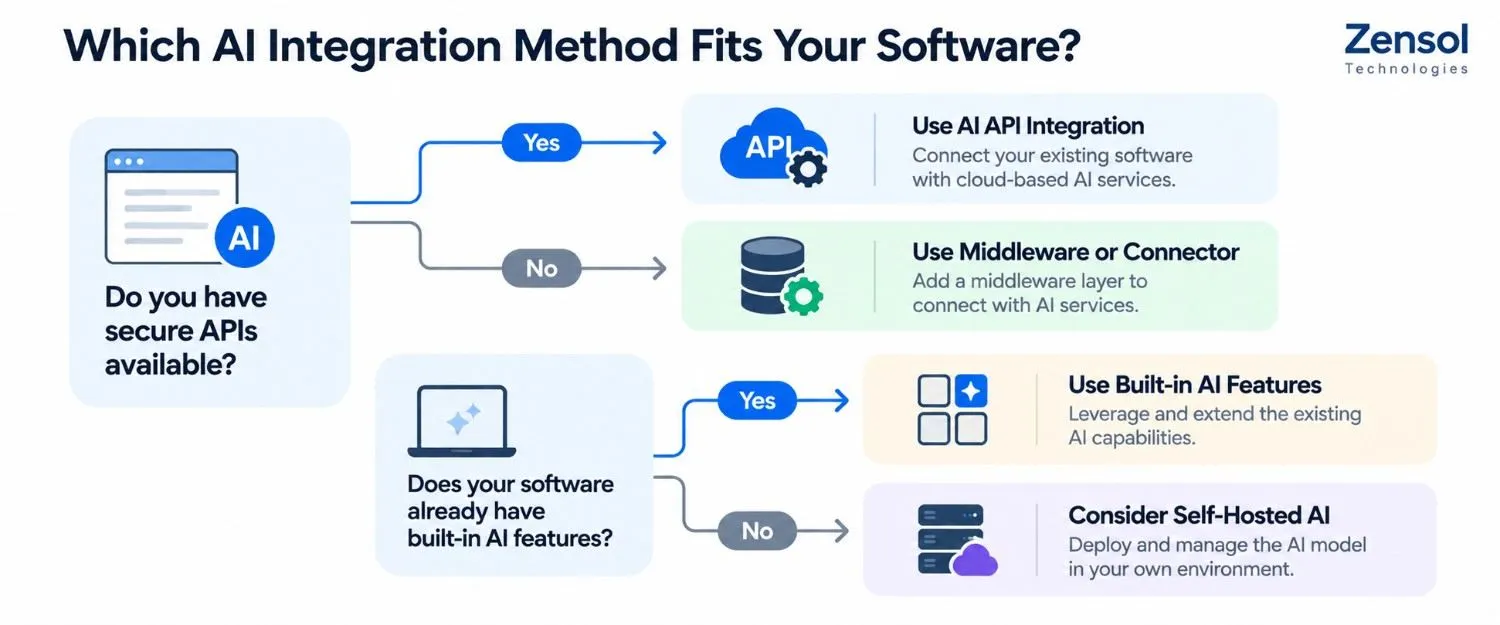
Does your software already provide secure APIs?
If yes, consider a backend AI API integration first. This often avoids unnecessary changes to your application's core architecture.
Does your software lack modern integration interfaces?
Evaluate supported connectors, middleware, or controlled exports. Avoid direct database modifications that bypass existing business rules.
Do users need AI answers based on private company documents?
Consider permission-aware retrieval and RAG. Apply authorization checks before information reaches the model.
Does the application handle sensitive or high-impact actions?
Use deterministic business rules and human approval for actions involving payments, permissions, or critical records.
Can the system operate when AI becomes unavailable?
If not, design a reliable fallback before deployment.
This framework helps businesses identify technical blockers before committing to development.
Practical Example: Adding AI to an Existing CRM
Consider a business that manually classifies customer inquiries inside its CRM.
The objective is to reduce repetitive administrative work while keeping customer records and financial actions under existing application controls.
How the Integration Works
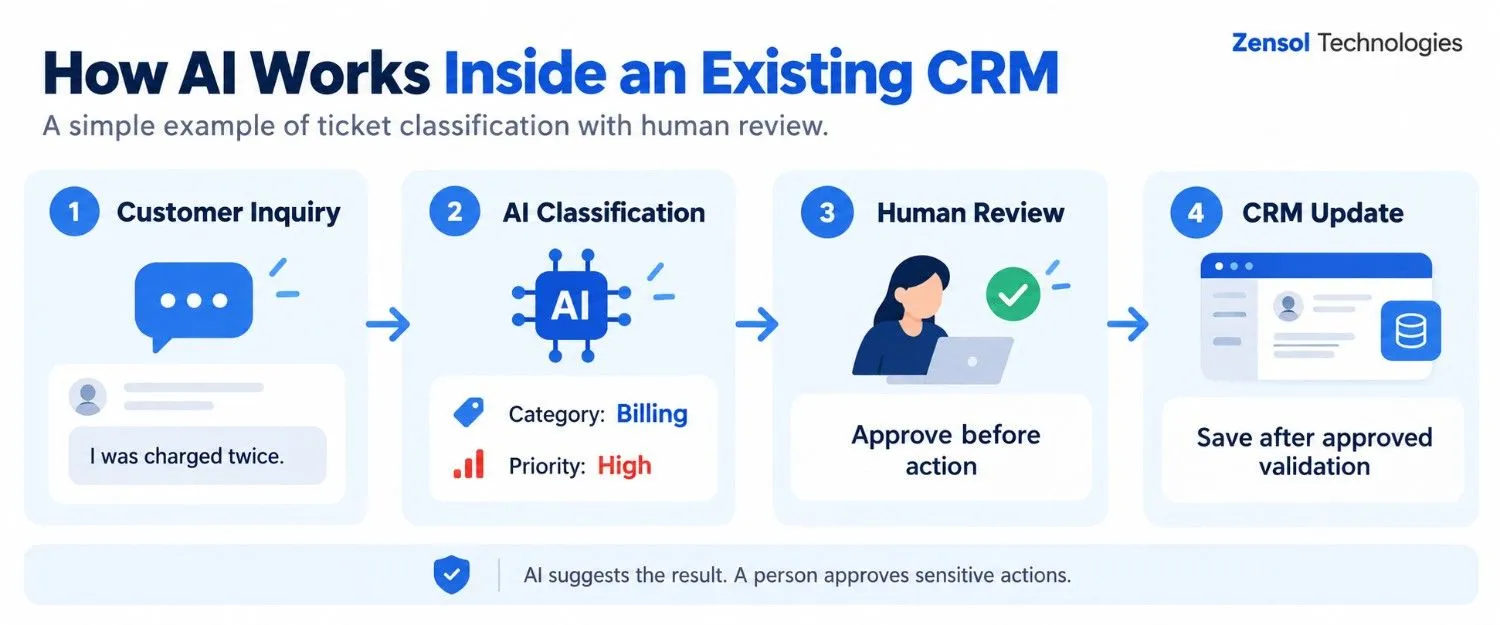
A customer submits this message:
"I was charged twice for my subscription and need help correcting the payment."
The CRM forwards the request to an authenticated backend service.
After verifying permissions, the backend sends the relevant message to the AI model.
An illustrative structured response might be:
{
"category": "billing",
"priority": "high",
"requires_human_review": true,
"summary": "Customer reports a duplicate charge."
}
The backend checks that the response contains valid fields and permitted values.
It also verifies the applicable business policy before accepting the priority recommendation.
The requires_human_review field indicates that an employee must examine the case. It does not authorize the AI to issue a refund or change payment records.
If validation fails, the ticket enters the existing manual review workflow.
How to Measure Integration Performance
Before deployment, the team could prepare 100 previously classified tickets and independently verify their categories.
Suppose the AI correctly classifies 88 tickets. Its accuracy on that sample is 88%.
However, accuracy alone is insufficient.
The team should also examine:
- Whether important ticket categories are underrepresented
- Which categories produce the most errors
- Whether urgent requests are incorrectly classified as routine
- How often employees correct AI suggestions
- Whether processing time improves compared with the manual workflow
Use additional unseen test cases before production deployment. The 100-ticket example is an illustrative initial evaluation, not a sufficient production benchmark.
This testing approach helps businesses integrate AI into existing software with measurable controls rather than relying on assumptions.
Common AI Integration Challenges and How to Avoid Them
Even a well-designed AI integration can encounter unexpected problems.
Incorrect customer references: An AI response may contain a valid-looking but incorrect customer ID. The backend must verify record ownership and authorization before saving any changes.
Prompt injection: A customer message may contain instructions attempting to override the system's rules. Treat external content as untrusted and enforce permissions outside the model.
Unexpected API failures: AI services may time out or become unavailable. Use controlled retries where appropriate and maintain manual fallback procedures.
Rising operating costs: Large requests and repeated model calls can increase expenses. Track usage by workflow and establish budget alerts.
Legacy compatibility: Older applications may lack suitable connectors. Evaluate middleware or limited modernization before replacing the entire platform.
These safeguards are essential when you integrate AI into existing software used in daily business operations.
How to Know If Your Software Is Ready for AI Integration
Before starting development, confirm that:
- Your application supports secure data exchange.
- The required information is accurate and accessible.
- You have identified one measurable business problem.
- Authentication and authorization rules are documented.
- Your team can test and monitor AI outputs.
- Someone owns maintenance, security, and operating costs.
If several requirements are missing, complete a technical assessment before implementation.
Final Thoughts
The best way to integrate AI into existing software is to begin with a clearly defined problem, assess your existing architecture, and introduce AI through a secure, manageable connection.
Success depends on reliable data, strict permissions, response validation, and measurable results—not simply choosing a powerful AI model.
Zensol Technologies helps businesses evaluate integration opportunities and build AI-enabled applications. If you're planning a project, explore our AI development services or discuss your requirements with our team.