
A software update can fix one problem while unexpectedly creating another. Imagine correcting a checkout error, only to discover that customers are being charged the wrong amount. Regression testing helps software teams catch these unintended defects by checking whether previously working features still function correctly after changes.
Software applications regularly receive new features, security patches, bug fixes, and performance improvements. Because different components often share code, databases, and external services, even a minor modification can affect functionality elsewhere.
Understanding regression testing helps developers, QA engineers, and businesses identify risks, select meaningful tests, and make informed release decisions without unnecessarily slowing development.
What Is Regression Testing?
Regression testing is a software testing technique that verifies whether previously working functionality continues to behave as expected after changes to an application. It helps identify unintended defects introduced by code modifications, bug fixes, configuration updates, dependency upgrades, or system integrations.
Unlike tests focused on newly developed features, regression testing in software testing examines whether those changes have disrupted existing behavior.
Consider a banking application introducing scheduled money transfers. Although the new scheduling feature may work correctly, developers must also verify that immediate transfers, account balances, and transaction records remain accurate.
Regression testing can involve unit, integration, API, and end-to-end tests. The appropriate combination depends on which components changed, their dependencies, and the consequences of failure.
The ISTQB Glossary provides standardized software testing terminology, including concepts related to regression testing, defects, and test coverage.
Passing a regression test suite provides evidence that the tested behaviors remain correct. It does not guarantee that every possible software defect has been eliminated.
Why Is Regression Testing Important?
Modern applications contain interconnected components. An e-commerce checkout, for example, may depend on inventory records, pricing services, tax calculations, and payment APIs. Changing one shared component can affect several functions, even when the modified feature passes its initial tests.
Regression testing helps identify these hidden problems before they disrupt business operations.
Its main benefits include:
- Protecting existing functionality: Verifies that important workflows continue operating correctly after updates.
- Detecting unintended defects: Identifies failures in components affected directly or indirectly by changes.
- Reducing release risks: Helps discover problems before they disrupt customers or business operations.
- Supporting frequent updates: Makes repeated verification more manageable through reusable tests.
- Improving release decisions: Provides evidence about tested functionality and remaining risks.
The impact of a regression depends on the affected feature. A broken search filter may inconvenience customers, while an incorrect billing calculation could create financial disputes.
Regression testing works best alongside broader software testing strategies, including functional, integration, security, and performance testing.
How Does Regression Testing Work?
The regression testing process begins by understanding recent changes, identifying affected functionality, selecting appropriate tests, and investigating the results.
The objective is not to run every available test after every modification. It is to verify the behaviors most likely to be affected.
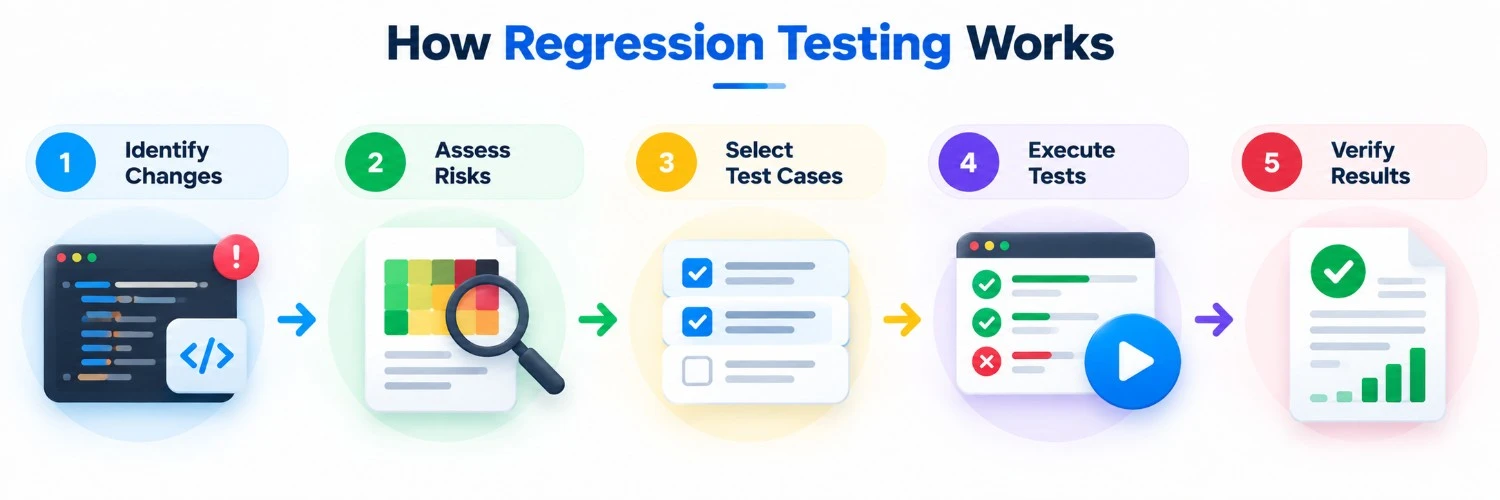
1. Identify Recent Software Changes
Developers and QA engineers review modified code, resolved defects, configuration adjustments, and updated dependencies.
They should determine what behavior changed and which existing components rely on that functionality.
For example, updating a shared date-handling function could affect appointment scheduling, invoices, and financial reports.
2. Assess Dependencies and Risks
Testers examine both direct dependencies and less obvious connections, such as shared databases, APIs, or background services.
Three factors help establish priorities:
- Business impact: How serious would a failure be?
- Change exposure: How closely does the feature depend on modified components?
- Defect history: Has the affected functionality failed frequently before?
A payment calculation generally deserves higher priority than an unrelated cosmetic adjustment.
3. Select Relevant Test Cases
The team selects regression test cases covering affected functionality. These may include unit, integration, API, and end-to-end tests.
Test quality matters more than quantity. Twenty tests confirming that checkout pages load cannot replace one meaningful assertion verifying the amount customers are charged.
4. Execute Tests and Investigate Failures
Selected tests run manually or automatically. Testers compare actual results with expected outcomes and investigate unexpected behavior.
Failures can result from genuine software defects, outdated expectations, unreliable test data, or unstable testing environments.
5. Verify Fixes and Review Results
After correcting confirmed defects, developers and testers verify the affected functionality and rerun relevant regression checks.
Release decisions should consider test results, unresolved issues, and known coverage gaps rather than relying solely on a passing test dashboard.
When Should Regression Testing Be Performed?
Regression testing should be considered whenever modifications could affect previously working functionality. Its frequency and scope depend on change complexity and potential business consequences.
Common situations include:
- After bug fixes: Check whether corrections affect related behavior.
- After new features: Verify interactions with existing components.
- After code refactoring: Confirm expected functionality remains unchanged.
- After dependency upgrades: Identify compatibility problems involving updated libraries or services.
- Before major releases: Validate important business workflows before deployment.
In continuous integration and continuous delivery (CI/CD) environments, teams may run fast automated checks after relevant code changes. Broader regression suites can run overnight or before significant releases.
This approach provides timely feedback without requiring every test to execute after every minor modification.
Types of Regression Testing
Regression testing techniques differ mainly in how teams select test cases and define testing scope. The terms below are commonly used, although their classifications are not universally standardized.
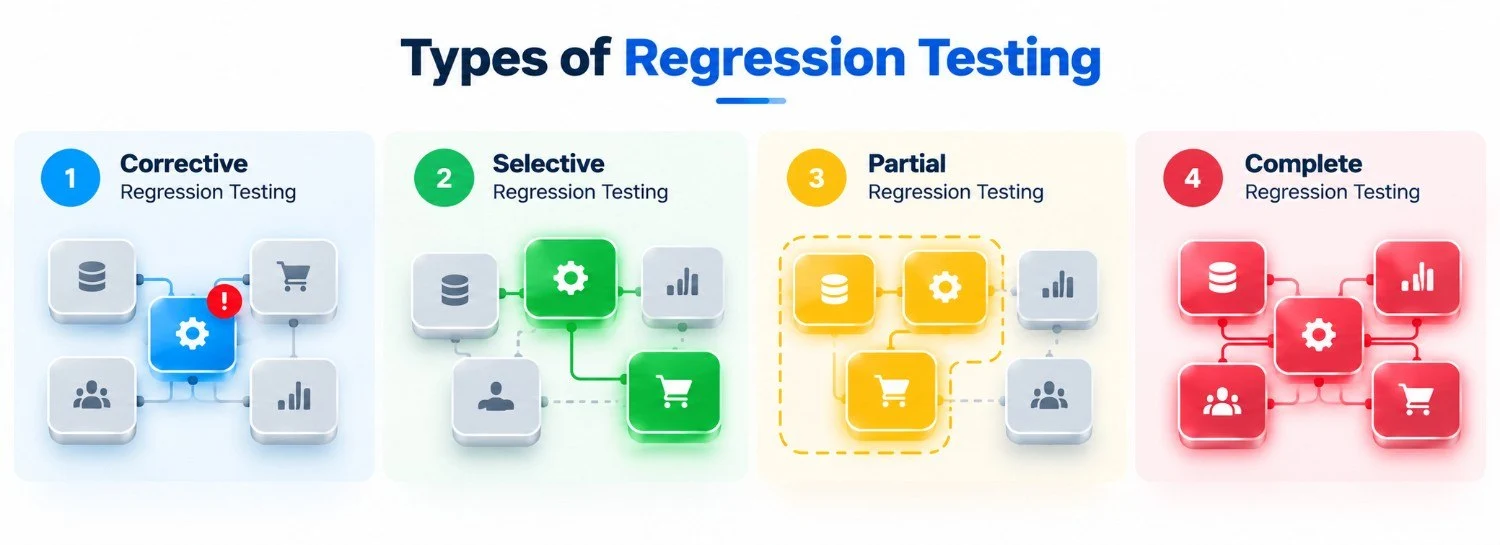
Corrective Regression Testing
Corrective regression testing generally reuses existing test cases when requirements and expected application behavior haven't changed.
For example, after an internal code cleanup that preserves existing functionality, previously established tests can verify that expected results remain unchanged.
Selective Regression Testing
Selective regression testing executes tests associated with modified components and their dependencies.
If developers update an authentication API, testers may prioritize login, password recovery, and session management. The main limitation is that an overlooked dependency could leave an affected feature untested.
Partial Regression Testing
Partial regression testing evaluates the changed functionality together with a broader affected portion of the application.
For example, modifying order processing may justify testing its interactions with inventory, invoicing, and payment systems without executing the entire regression suite.
In practical terms, selective testing emphasizes choosing particular test cases, while partial testing describes a wider affected testing scope. These labels can overlap, so teams should document exactly which components and workflows they intend to cover.
Complete Regression Testing
Complete regression testing runs a comprehensive regression suite covering major application behaviors.
Teams may choose this approach after architectural changes or before high-risk releases. Although it increases coverage, it requires more time and resources.
Even comprehensive suites cannot detect defects in scenarios they never test.
A Practical Regression Testing Example
Consider a hypothetical e-commerce application that originally permits one discount coupon per order. Developers introduce functionality allowing customers to combine selected promotional offers.
The new feature passes its initial tests. However, the modified discount logic also supplies values to existing tax and payment services.
The QA team selects regression checks covering single-coupon orders, combined discounts, tax calculations, and checkout totals.
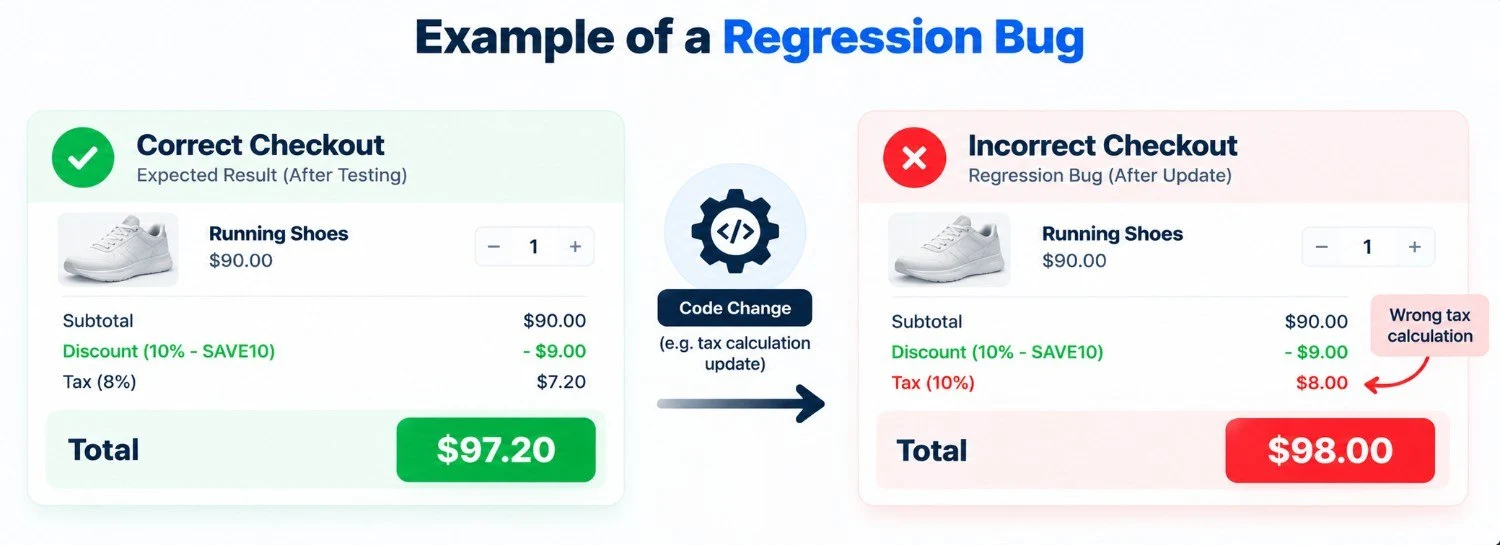
How the Defect Appears
A customer purchases a $100 item and applies an eligible $10 discount using the original single-coupon workflow.
For this simplified example, assume an 8% sales tax applies to the discounted amount, with no shipping charges.
Expected total: ($100 − $10) + ($90 × 0.08) = $97.20
An automated regression test uses these inputs and verifies that the final checkout total equals $97.20.
Instead, the application displays $98.00 because the updated pricing service calculates tax using the original $100 price.
The new coupon-combination feature works, but changes to shared calculation logic have broken an existing workflow.
Developers correct the issue and rerun the relevant discount, tax, and payment checks.
This demonstrates the difference between superficial testing and meaningful assertions. Checking whether checkout loads would miss the defect; verifying the calculated total reveals it.
Regression Testing vs. Retesting
Regression testing and retesting often occur after defect corrections, but they serve different purposes.
Retesting verifies that a specific reported defect has been corrected. Regression testing checks whether the correction or another modification has unintentionally affected previously working functionality.
| Comparison | Regression Testing | Retesting |
|---|---|---|
| Purpose | Detect unintended effects | Verify a specific defect correction |
| Trigger | Updates, modifications, or fixes | Correction of a known defect |
| Scope | Relevant existing functionality | Previously failing behavior |
| Test selection | Based on risks and dependencies | Based on the original defect |
| Expected outcome | Existing behavior remains correct | Reported defect is resolved |
For example, after developers fix a login error, retesting verifies that affected users can sign in. Regression testing checks whether password recovery, permissions, or session management have been disrupted.
Both methods contribute to software quality, but neither replaces the other.
Manual vs. Automated Regression Testing
Regression testing can be performed manually or through automation. The right approach depends on how often tests run, the risks involved, and the effort required to maintain them.
When Is Manual Regression Testing Appropriate?
Manual regression testing is useful for exploratory checks, complex user interactions, and scenarios requiring human judgment. It also makes sense for rarely executed tests or rapidly changing features where automation would require frequent updates.
However, repeatedly executing large manual test suites can become time-consuming and inconsistent.
When Should Regression Testing Be Automated?
Automated regression testing is ideal for stable, repeatable workflows with clear expected results, such as login validation, checkout calculations, and API responses.
Tools such as Playwright and Selenium support browser-based test automation.
Automation provides the most value when tests run frequently, failures carry significant risks, and maintenance requirements remain manageable. Less predictable scenarios may still benefit from manual testing.
The goal is not to automate every test, but to achieve reliable coverage with reasonable testing effort.
Regression Testing Best Practices
Effective regression testing requires selecting relevant test cases, maintaining reliable automation, and focusing on functionality most likely to be affected by software changes.
- Prioritize high-risk tests: Start with critical workflows affected by recent changes, followed by shared dependencies and components with previous defects. Schedule lower-priority tests separately when necessary.
- Use meaningful assertions: Verify actual outcomes, such as payment totals or user permissions, rather than simply checking whether a page loads.
- Maintain test independence: Use consistent test data and avoid unnecessary dependencies between test cases.
- Review test coverage: Update regression suites when new features, integrations, or business rules introduce additional risks.
- Integrate testing into CI/CD: Run fast automated checks frequently and schedule broader testing before important releases.
For example, if only 20 of 100 tests can run before deployment, prioritize affected payment and checkout workflows. Review the risks associated with unexecuted tests before approving the release.
Common Regression Testing Challenges
As applications grow, regression testing can become slower and harder to maintain. Common challenges include:
- Slow execution: Large test suites delay feedback. Prioritize relevant checks and schedule comprehensive runs separately.
- Hidden dependencies: Changes to shared components can affect unrelated features. Review APIs, data flows, and connected services.
- Flaky automated tests: Unstable environments or inconsistent test data cause misleading failures. Investigate underlying causes instead of repeatedly rerunning tests.
- Incomplete coverage: Passing tests may overlook important business scenarios. Review critical workflows and strengthen weak test assertions.
Addressing these challenges helps teams maintain reliable test results, reduce unnecessary testing effort, and identify meaningful defects before release.
Final Thoughts
Regression testing helps software teams detect unintended defects, protect existing functionality, and assess changes before release. Its effectiveness depends on understanding dependencies, selecting meaningful tests, and investigating failures rather than relying only on test counts.
A risk-based approach helps teams focus on critical workflows while balancing testing effort with development speed. Combining targeted checks with broader verification when necessary supports more dependable software releases without requiring every feature to be retested after every change.