A landing page can attract steady traffic without producing a single worthwhile inquiry. If you are asking, “What is a landing page conversion?” it means a visitor has completed an action your page was created to encourage, such as requesting a quote, booking a demonstration, or purchasing a product. This guide explains conversion types, reliable calculations, Google Analytics 4 (GA4) tracking, and the difference between impressive numbers and valuable customers. This distinction prevents misleading reports and expensive marketing decisions.
What Is a Landing Page Conversion?
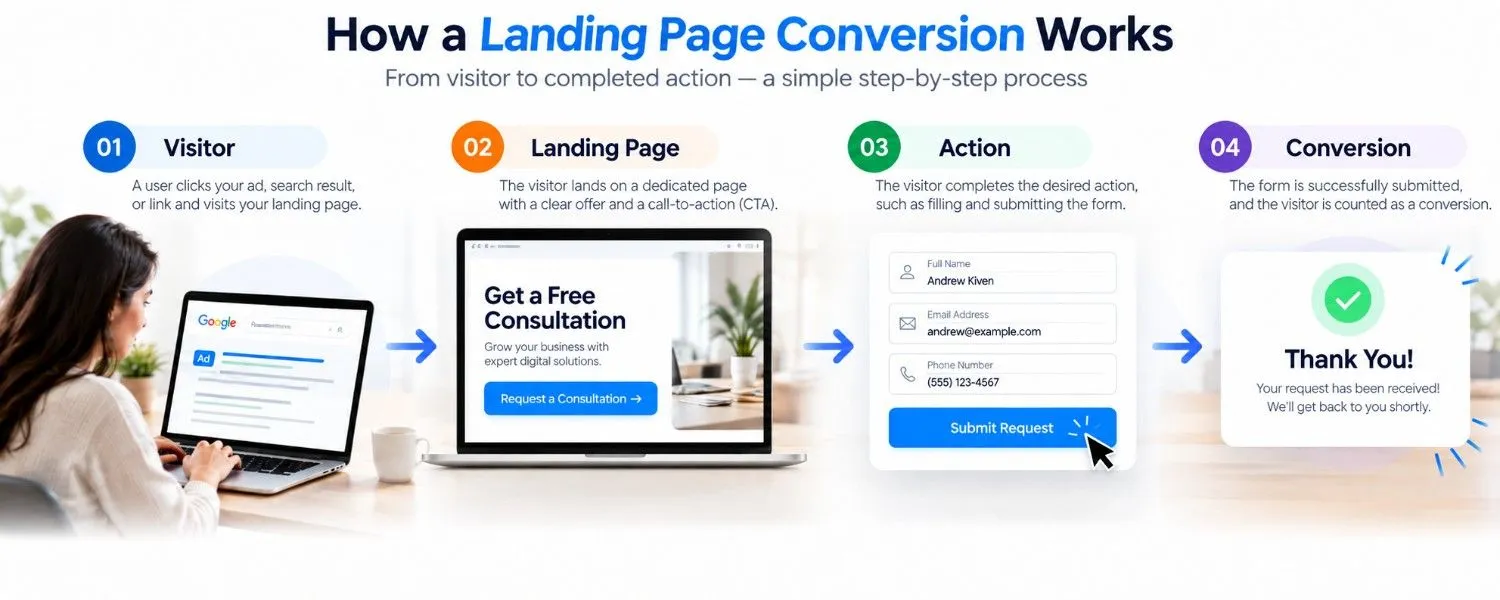
A landing page conversion is a completed, predefined action connected to the page’s business objective. A visitor reading your offer is not automatically a conversion; someone successfully submitting the consultation form may be. The relevant action changes with the offer. A retailer wants completed orders, while a software company might prioritize scheduled demonstrations.
A free-trial signup represents progress toward a customer relationship, but it is different from a paid subscription.
What Counts as a Landing Page Conversion?
For lead generation campaigns, common conversions include completed inquiry forms, appointment bookings, quote requests, and demo registrations. For e-commerce, a successful purchase may be the primary goal. Subscription businesses sometimes prioritize activated accounts rather than registrations alone, particularly when signups frequently go unused.
Primary and Supporting Actions
A macro-conversion represents the main desired outcome, such as a purchase or confirmed appointment. A micro-conversion is a smaller signal of interest, such as opening a pricing section, starting a form, or clicking a call button. Both can inform decisions, but reporting them together as equivalent successes inflates performance.
For example, clicking “Submit” is not proof that a form was delivered. Validation errors or server failures may prevent completion. Ideally, the conversion event fires only when the application confirms success. Likewise, clicking a phone number does not prove a call connected.
What Is a Landing Page Conversion Rate?
Conversion count shows how many important actions occurred. Conversion rate shows the proportion of visitors or sessions associated with a successful outcome.
Imagine two pages each produce 40 booked consultations. One receives 800 sessions and the other receives 2,000. Their session conversion rates are 5% and 2%, respectively, assuming each booking occurred in a distinct session.
How Do You Calculate Landing Page Conversion Rate?
For a session-based conversion rate, use this formula:
Session conversion rate (%) = (Sessions containing the desired conversion ÷ Total eligible sessions) × 100
If 75 of 1,500 landing page sessions contain at least one completed inquiry, the rate is 5%. For a user-based rate, divide distinct users who converted by distinct eligible users instead.
Users, Sessions, and Events Are Different
A user is an identifiable visitor within the limitations of your analytics setup. A session is a period of activity; the same user can initiate multiple sessions. An event is a recorded interaction, and one session can contain multiple events.
Suppose a returning visitor starts two sessions and submits a form three times. Analytics could register one user, two sessions, and three submission events. Dividing three events by two sessions produces 150%, but that is not a valid session conversion rate. If both sessions included a successful submission, the session conversion rate is 100%.
Also distinguish the landing page where a session starts from the page where an action happens. Someone could enter through a campaign page and complete registration later on a checkout or confirmation page.
How Do You Track Landing Page Conversions in GA4?
GA4 records interactions as events and lets you designate important business actions as key events. An effective setup follows four steps: defining success, implementing the event, testing its behavior, and reviewing the appropriate report.
Define the Goal Before Configuring Tracking
Choose one primary outcome that reflects the page’s purpose. For an agency landing page, that could be a completed consultation request. Track supporting actions, such as form starts, separately so interest is not mistaken for genuine inquiries.
Implement and Test the Event
Verify that your Google tag or Google Tag Manager setup is collecting data. For lead submissions, the recommended GA4 event generate_lead may be suitable when your implementation detects a genuinely successful submission. Depending on your form system, that confirmation may come from a successful server response or a dedicated confirmation state.
In GA4, find the event under the administration area for events and mark it as a key event, following Google’s current configuration guidance. Test a successful submission in Realtime or DebugView, then test an invalid submission. The event should appear for success, not for failure. Check for duplicate firing when users refresh a confirmation page or click repeatedly.
Analyze Sessions and Key Events
Open the GA4 Landing page report, which is generally found under Reports and Engagement when published in the property. Locate your campaign page and review sessions alongside the relevant key event. An Editor or Administrator can customize available reports, and an exploration may help isolate the appropriate session key event rate.
This report associates later activity with the session’s entrance page. It does not necessarily mean the action took place on that page itself. Segment results by traffic source or device to identify meaningful differences without mixing incomparable audiences.
Reconcile Analytics With Business Records
Compare lead events with actual form submissions and qualified opportunities in your CRM. For purchases, compare analytics with confirmed orders. Consent settings, ad blockers, attribution differences, and faulty implementation can create discrepancies.
Which Landing Page Conversion Metrics Matter?
A useful measurement framework combines activity, efficiency, and business value instead of treating conversion rate as the only success indicator.
| Metric | Meaning | Business use |
|---|---|---|
| Session conversion rate | Share of eligible sessions that converted | Evaluate page efficiency |
| Key event count | Number of recorded important actions | Monitor action volume |
| Qualified lead rate | Qualified inquiries divided by eligible traffic | Evaluate lead relevance |
| Cost per conversion | Campaign spend divided by attributed conversions | Monitor acquisition efficiency |
| Revenue per visitor | Revenue relative to measured visitors | Connect activity to sales |
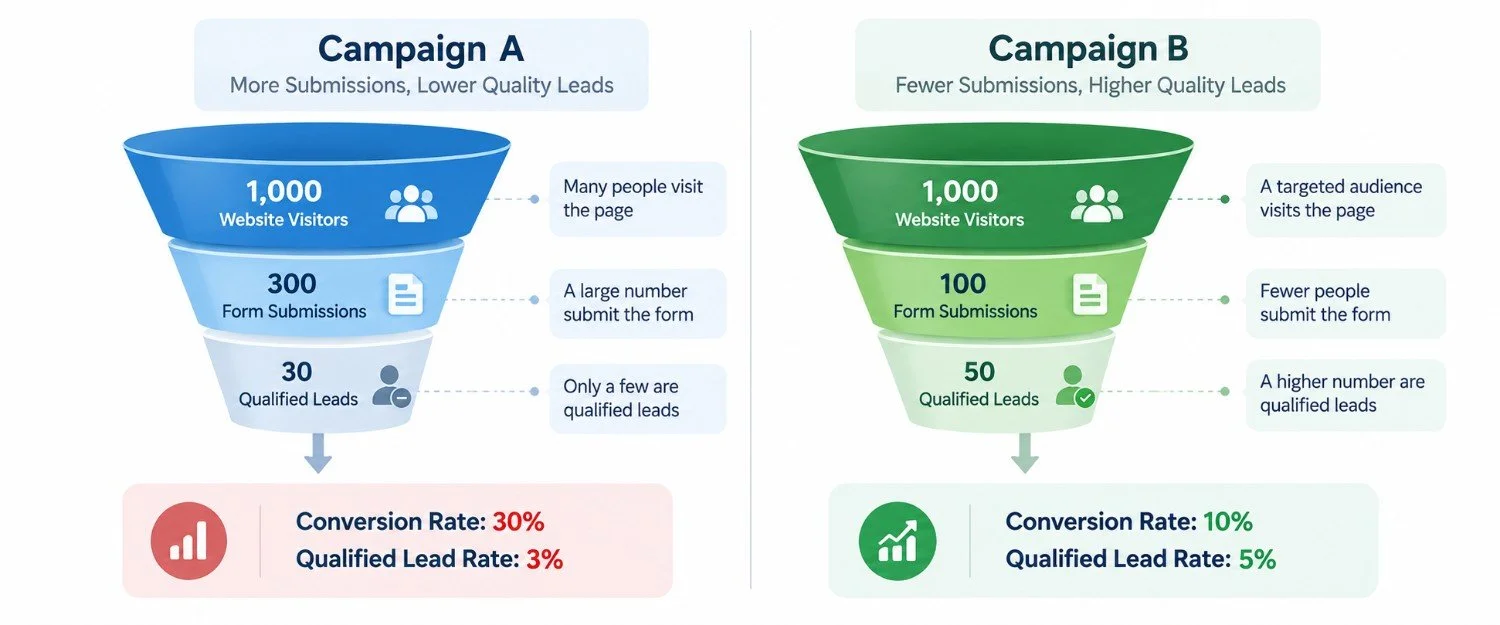
Consider an illustrative comparison. Campaign A receives 2,000 sessions and 100 form submissions, while Campaign B receives 2,000 sessions and 60. Their submission rates are 5% and 3%. However, sales qualifies only 20 inquiries from A and 45 from B. The qualified-lead rates are 1% and 2.25%. Campaign B attracts fewer submissions but more relevant opportunities.
What Is a Good Landing Page Conversion Rate?
No single percentage defines a good result across every industry or campaign. A free download requires less commitment than an enterprise purchase, and visitors searching for a specific brand often behave differently from people seeing a new offer for the first time.
Use your own comparable history as the starting benchmark. Compare the same conversion action across similar traffic sources, devices, and reporting periods. Then ask whether changes increase qualified leads or revenue without making acquisition costs unsustainable.
Why Is Your Landing Page Not Converting?
Investigate problems in a practical sequence. First, verify tracking: complete a test action and confirm it appears exactly as intended. Otherwise, you might redesign a page that is already generating leads.
Next, assess audience fit. An advertisement promising inexpensive website templates will attract different visitors from one offering custom enterprise software. If the landing page does not match the expectation created by the ad, many visitors will leave without acting.
Finally, inspect friction. Long forms, unclear next steps, weak credibility signals, inaccessible mobile controls, and confusing error messages can interrupt the conversion journey. Properly tracked form starts and successful completions help pinpoint where the process breaks down.
How Can You Improve Landing Page Conversions?
Prioritize changes based on observed problems rather than popular design tips. Match the headline and offer to the traffic source, clearly explain what happens after submission, and remove form fields that are not essential. Check mobile usability and confirm that the complete journey works, including confirmation messages and follow-up delivery.
When traffic permits, test one meaningful hypothesis at a time. For instance, compare a shorter inquiry form with the current version, then judge success by qualified leads rather than button clicks alone. Our landing page optimization guide covers broader page improvements, while the conversion rate optimization guide explains the larger testing process.
Conclusion
Landing page conversions represent completed actions, while conversion rates explain how frequently those outcomes occur relative to eligible traffic. Reliable evaluation depends on choosing a meaningful goal, counting consistently, testing the analytics setup, and checking whether reported leads actually benefit the business. Before spending more on advertising, verify your events and compare conversion quality with the numbers in your reports.