The best SEO reporting tools help businesses track search visibility, organic traffic, keyword rankings, technical SEO, backlinks, and conversions in one reporting workflow. Some platforms provide complete SEO reporting software, while others specialize in analytics, crawling, competitor research, dashboards, or automated client reports.
In this guide, we compare 10 leading SEO reporting tools based on reporting capabilities, technical coverage, rank tracking, integrations, automation, pricing, and the type of business each platform suits best.
Quick Answer: What Are the Best SEO Reporting Tools in 2026?
The best SEO reporting tools in 2026 include Semrush for comprehensive SEO reporting, Ahrefs for backlink and competitor research, SE Ranking for agency workflows, Screaming Frog for technical SEO, AgencyAnalytics for client reporting, and Looker Studio for customizable dashboards. Google Search Console and Google Analytics 4 remain essential free sources for first-party search and conversion data.
Most businesses do not need a single platform. A stronger reporting stack usually combines first-party data, specialist SEO software, and a dashboard or reporting layer.
Best SEO Reporting Tools at a Glance
| Category | Recommended Tool |
|---|---|
| Best overall | Semrush |
| Best for backlinks | Ahrefs |
| Best for agencies | SE Ranking |
| Best for technical SEO | Screaming Frog |
| Best for client reporting | AgencyAnalytics |
| Best free search reporting | Google Search Console |
| Best conversion analytics | Google Analytics 4 |
| Best custom dashboard | Looker Studio |
| Best for smaller teams | Moz Pro |
| Best enterprise intelligence | Similarweb |
How We Evaluated These Tools
We assessed these SEO reporting tools based on reporting capabilities, keyword tracking, technical SEO, backlink analysis, automation, integrations, and overall value. We also considered ease of use, pricing, and suitability for businesses, agencies, and in-house SEO teams.
Our evaluation draws on available product workflows, official documentation, and published feature specifications. Where direct access was available, we examined reporting features and dashboards; otherwise, we relied on vendor documentation rather than claiming hands-on testing.
We considered each tool's strengths, limitations, and practical use cases to help readers choose software that fits their reporting needs. Pricing and features may vary by plan, so check the latest vendor information before purchasing.
What Are SEO Reporting Tools and Software?
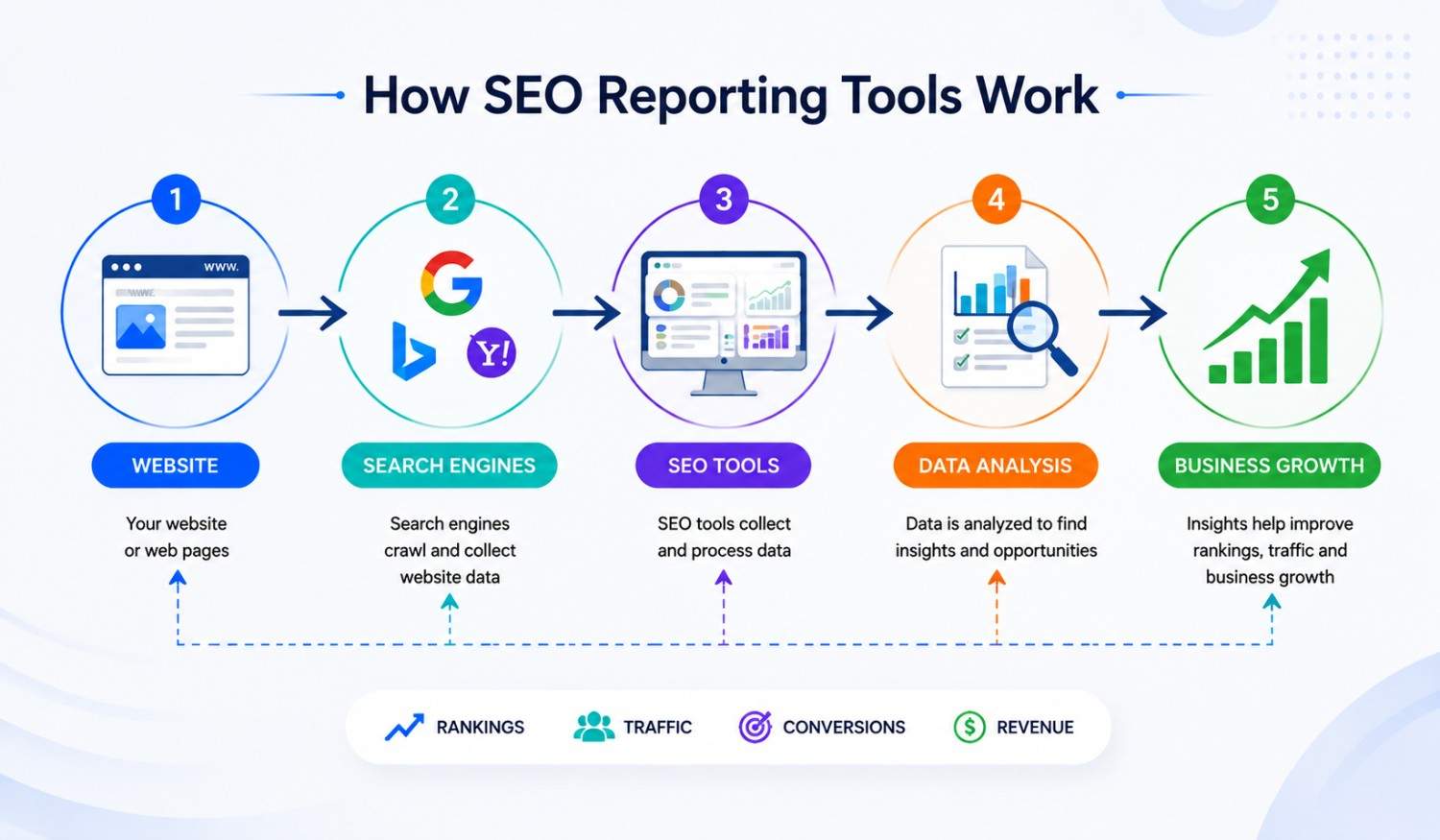
SEO reporting tools collect, organize, and present information about organic search performance. Depending on the platform, they may combine keyword rankings, Search Console data, website analytics, crawl findings, backlinks, competitor visibility, conversions, and AI-search metrics.
Some SEO reporting software collects proprietary data, while other platforms primarily visualize or automate information from connected sources. Semrush and Ahrefs, for example, provide their own SEO datasets, while Looker Studio is primarily a reporting and visualization layer.
Businesses use these tools to monitor visibility, diagnose performance changes, measure conversions, communicate results, and prioritize the next SEO actions.
SEO Reporting Tools vs. SEO Reporting Software
The terms overlap, but there is a useful distinction.
SEO analysis tools help marketers investigate rankings, backlinks, competitors, keywords, and technical issues. Ahrefs, Semrush, and Screaming Frog are strong examples.
SEO reporting software focuses more heavily on organizing metrics, creating dashboards, automating reports, and communicating results. AgencyAnalytics and Looker Studio are more reporting-oriented.
Many modern platforms do both. The right choice depends on whether your priority is analysis, reporting, or a combination of the two.
Why SEO Reporting Tools Matter
SEO reporting tools help businesses monitor keyword rankings, organic traffic, technical issues, and search visibility. They make it easier to identify performance changes, investigate potential causes, and prioritize improvements.
Effective SEO reporting goes beyond traffic and rankings. By connecting search performance with conversion rate optimization, businesses can measure leads, sales, and revenue - not just website visits. A useful report should answer three questions: What changed? Why does it matter? What should we do next?
Key Features to Look for in SEO Reporting Software
Before choosing SEO reporting software, prioritize features that match your SEO goals, reporting needs, and budget.
- Keyword Rank Tracking: Monitor keyword positions across locations, devices, and search results over time.
- Organic Traffic Analysis: Measure organic traffic, landing-page performance, engagement, and conversions.
- Technical SEO Monitoring: Identify crawl errors, indexing issues, and site health problems. Use these insights alongside a website content audit to identify improvement opportunities.
- Backlink Analysis: Track referring domains, new and lost backlinks, and competitor link profiles.
- Custom SEO Dashboards: Create clear reports highlighting rankings, traffic, conversions, and key performance trends.
- Reporting Automation: Schedule recurring reports, automate data updates, and reduce manual reporting tasks.
- Integrations: Connect Google Search Console, GA4, CRM systems, and other platforms for streamlined digital marketing reporting.
- AI Search Visibility: Evaluate supported AI mentions, citations, and referral data using relevant AI search visibility metrics and KPIs.
Selection tip: Prioritize accurate data and the reporting features you'll actually use. Check integrations, usage limits, and plan restrictions before purchasing.
SEO Reporting Tools & Software Comparison
The best SEO reporting tool depends on whether you need search performance data, competitor research, technical audits, or automated client reports. Compare each tool's strengths and limitations before choosing your setup.
| Tool | Best For | Key Advantage | Main Limitation | Choose It When |
|---|---|---|---|---|
| Google Search Console | Google search performance | First-party clicks, impressions, CTR, and rankings data | Limited competitor and backlink analysis | You need free Google search performance data |
| Google Analytics 4 | Traffic and conversions | Tracks organic visits, user behavior, and conversions | Doesn't provide independent keyword rank tracking | You need to measure traffic quality and business outcomes |
| Semrush | All-in-one SEO research | Combines rank tracking, audits, backlinks, and competitor research | Advanced features may require higher-tier plans | You want SEO research and monitoring in one platform |
| Ahrefs | Backlinks and competitors | Strong backlink, keyword, and competitor analysis | Costs and reporting capabilities depend on your workflow and plan | Link analysis and organic competitor research are priorities |
| Moz Pro | SEO monitoring and auditing | Combines rank tracking, keyword research, and site audits | Campaign and data limits vary by plan | You want an integrated SEO toolkit |
| SE Ranking | Multi-project SEO management | Combines rank tracking, audits, and agency workflows | Reporting and white-label options depend on the plan | You manage multiple websites or client campaigns |
| Screaming Frog SEO Spider | Technical SEO audits | Detailed crawls identify broken links, redirects, and metadata issues | Doesn't replace traffic analytics or rank tracking | You need detailed technical crawl data |
| Looker Studio | Custom SEO dashboards | Builds tailored reports from connected data sources | Requires configuration and suitable connectors | You want flexible dashboards using existing data |
| AgencyAnalytics | Agency client reporting | Centralizes marketing data in branded dashboards and reports | Depends on connected platforms for many SEO metrics | You need recurring, white-label client reports |
| Similarweb | Market and competitor intelligence | Estimates competitor traffic and market trends | Estimates aren't first-party website analytics | You need market context beyond your own website |
Important: These tools serve different purposes. Search Console and GA4 provide first-party performance data; Semrush, Ahrefs, Moz Pro, and SE Ranking support SEO research; Screaming Frog specializes in crawling; and Looker Studio and AgencyAnalytics help present data in reports. Similarweb provides market and competitor intelligence. Many teams combine several tools rather than relying on one platform.
Features, integrations, reporting limits, and pricing vary by plan. Check current vendor documentation before purchasing.
10 Best SEO Reporting Tools in 2026
1. Google Search Console: Best Free Search Data
Search Console is the foundation of Google organic-search reporting. It shows queries, pages, clicks, impressions, CTR, average position, indexing information, and Core Web Vitals.
Best for: First-party Google visibility.
Limitation: Minimal competitor data, and query tables omit some lower-volume information.
2. Google Analytics 4: Best for Conversions
GA4 reports what users do after reaching a website or app through acquisition, event, ecommerce, and conversion data. The standard version is free; Analytics 360 adds higher limits and enterprise support.
Best for: Behavior, attribution, and conversions.
Limitation: It does not replace rank tracking, crawling, or backlink research, and weak implementation produces unreliable reports.
3. Semrush: Best All-in-One SEO Reporting Tool
Semrush combines position tracking, site audits, backlink analysis, keyword research, competitor intelligence, and reporting in one broader SEO platform. This makes it a strong choice for teams that want to investigate performance and report on it without relying on several separate specialist tools.
Best for: Agencies and in-house SEO teams managing ongoing campaigns across rankings, technical SEO, competitors, content, and backlinks.
Why we recommend it: Semrush is most useful when reporting needs to connect several parts of SEO. If rankings decline, teams can investigate keyword movements alongside technical problems, competitor activity, and backlink changes within the same ecosystem.
What makes it different: Its main advantage is breadth. It supports both SEO analysis and ongoing reporting rather than focusing on only one reporting function.
Who should skip it: Small businesses that mainly need Search Console metrics, conversions, and a simple monthly dashboard may find the platform more extensive than necessary.
Semrush vs. Ahrefs: Choose Semrush when you want a broader all-in-one SEO workflow. Consider Ahrefs when backlinks, competitor analysis, and content research are your main priorities.
4. Ahrefs: Best for Backlink and Competitor Reporting
Ahrefs combines Site Explorer, Rank Tracker, Site Audit, competitive research, and Brand Radar, making it particularly useful when SEO reporting needs to explain why competitors are gaining visibility and where new opportunities exist.
Best for: SEO specialists, content teams, and businesses that prioritize backlinks, competitor research, and organic-search opportunities.
Why we recommend it: Ahrefs is strongest when reporting goes beyond simply showing ranking changes. Teams can use its data to investigate lost or gained backlinks, compare competitors, discover content gaps, monitor keyword performance, and understand changes in organic visibility.
What makes it different: Its value lies heavily in research and diagnosis. It helps explain the competitive factors behind SEO performance rather than acting only as a dashboard tool.
Who should skip it: Businesses whose primary need is white-label client dashboards or simple cross-channel monthly reporting may be better served by a dedicated reporting platform.
Ahrefs vs. Semrush: Choose Ahrefs when backlink intelligence and competitive SEO research matter most. Choose Semrush when you need a broader combination of SEO research, monitoring, and campaign reporting.
5. Moz Pro: Best for an Approachable Workflow
Moz Pro provides rank tracking, crawling, keyword research, link analysis, and custom reports in an accessible interface. Plans start at $49 monthly, with annual discounts.
Best for: Smaller teams that want guided SEO workflows.
Limitation: Keyword, crawl, and campaign limits may constrain larger portfolios.
6. SE Ranking: Best for Agency and Multi-Client SEO Reporting
SE Ranking combines keyword rankings, website audits, competitor research, backlinks, scheduled reports, and agency-focused functionality in one platform. That combination makes it particularly relevant to agencies that need both SEO execution and reporting across multiple projects.
Best for: Growing SEO agencies, consultants, and businesses managing multiple websites or client campaigns.
Why we recommend it: SE Ranking provides more than a reporting dashboard. Teams can monitor rankings, identify technical issues, research competitors, review backlinks, and turn those findings into recurring reports without moving between completely separate systems.
What makes it different: It sits between a specialist SEO platform and an agency reporting solution. That makes it useful for teams that want operational SEO features alongside client-facing reporting workflows.
Who should skip it: Businesses managing only one small website and requiring basic Search Console or GA4 reporting may not need its multi-project and agency-oriented capabilities.
7. Screaming Frog SEO Spider: Best Technical Crawler
Screaming Frog audits links, redirects, metadata, directives, duplicates, structured data, and other technical elements. The free version crawls 500 URLs, while the paid licence adds more advanced crawling, integrations, scheduling, and extraction capabilities.
Best for: Technical SEO audits, migrations, and diagnosing crawl-related problems.
Why we recommend it: Screaming Frog is particularly useful when performance problems require page-level technical investigation. It can reveal broken links, redirect chains, duplicate metadata, crawl restrictions, internal-link issues, and other problems that may not be obvious in high-level reporting dashboards.
What makes it different: It is primarily a technical diagnostic tool rather than a general SEO reporting platform. Its strength is detailed crawl data, making it especially valuable alongside Search Console and GA4.
Limitation: It does not replace rank tracking, competitor research, traffic analytics, or executive dashboards.
8. Looker Studio: Best Custom Dashboard Builder
Looker Studio creates customizable reports using data from sources such as Google Search Console, GA4, Sheets, and BigQuery. It is best viewed as a reporting and visualization layer rather than a standalone SEO research platform.
Best for: Custom SEO dashboards, management reporting, and combining multiple data sources.
Why we recommend it: Looker Studio gives teams greater control over which SEO metrics are displayed and how they are presented. It can bring search visibility, traffic, conversions, and other marketing data into one dashboard instead of requiring stakeholders to check several platforms separately.
Who should use it: Businesses, agencies, and analytics teams that already have reliable SEO data but need a clearer way to present it to clients, managers, or executives.
Limitation: Dashboard quality depends on the connected data sources, setup, and reporting expertise.
9. AgencyAnalytics: Best for Client Reporting
AgencyAnalytics focuses on recurring client reporting through automated reports, white-label dashboards, client portals, and integrations with other SEO and marketing platforms.
Best for: Agencies managing reporting across multiple clients.
Why we recommend it: AgencyAnalytics can reduce the manual work involved in collecting metrics from several platforms and rebuilding similar client reports every month. Its strength is turning connected marketing and SEO data into consistent, client-friendly dashboards and automated reports.
AgencyAnalytics vs. SE Ranking: Choose AgencyAnalytics when client dashboards, white-label reporting, and automation are the main priorities. Choose SE Ranking when you also need stronger built-in SEO execution features such as rank tracking, audits, competitor research, and backlink analysis.
Limitation: Deeper SEO research still depends on specialist tools or connected platforms.
10. Similarweb: Best for Market and AI Intelligence
Similarweb provides competitor traffic estimates, channel benchmarks, audience insights, AI visibility, prompt analysis, citations, sentiment, and AI referral intelligence. AEO Intelligence starts at $99 monthly with annual billing.
Best for: Enterprise market and competitor analysis.
Limitation: Estimates should inform comparisons, not replace first-party analytics.
Best Free SEO Reporting Tools & Software
Businesses do not always need paid SEO reporting software to build a useful reporting system. A strong free setup can combine several specialized tools.
Google Search Console provides first-party search visibility and indexing data, while Google Analytics 4 adds traffic, engagement, and conversion reporting. Looker Studio can combine those sources into customizable dashboards, and the free version of Screaming Frog can support technical crawling for smaller websites.
Recommended free SEO reporting stack: Google Search Console + GA4 + Looker Studio. Add Screaming Frog when technical crawling is required.
Paid software becomes more valuable when teams need advanced rank tracking, backlink analysis, competitor intelligence, white-label reporting, or multi-client automation.
Best SEO Reporting Tools by Business Type
Agencies
Use AgencyAnalytics for client dashboards and automated reporting, SE Ranking for multi-client SEO workflows, or Semrush when you need broader SEO research and campaign management.
In-House SEO Teams
A strong setup is Semrush or Ahrefs + Search Console + GA4. This gives teams competitor research, backlinks, keyword tracking, first-party search data, and conversion insights.
Technical SEO Teams
Use Screaming Frog + Google Search Console + GA4. This combination covers crawling, indexing, technical issues, search visibility, and post-click performance.
Enterprise Companies
Enterprise teams usually need a broader stack: Semrush or Ahrefs + Search Console + GA4 + Similarweb + a BI/reporting layer. Prioritize scalability, integrations, automation, permissions, and multi-market reporting.
How to Choose the Right SEO Reporting Tool
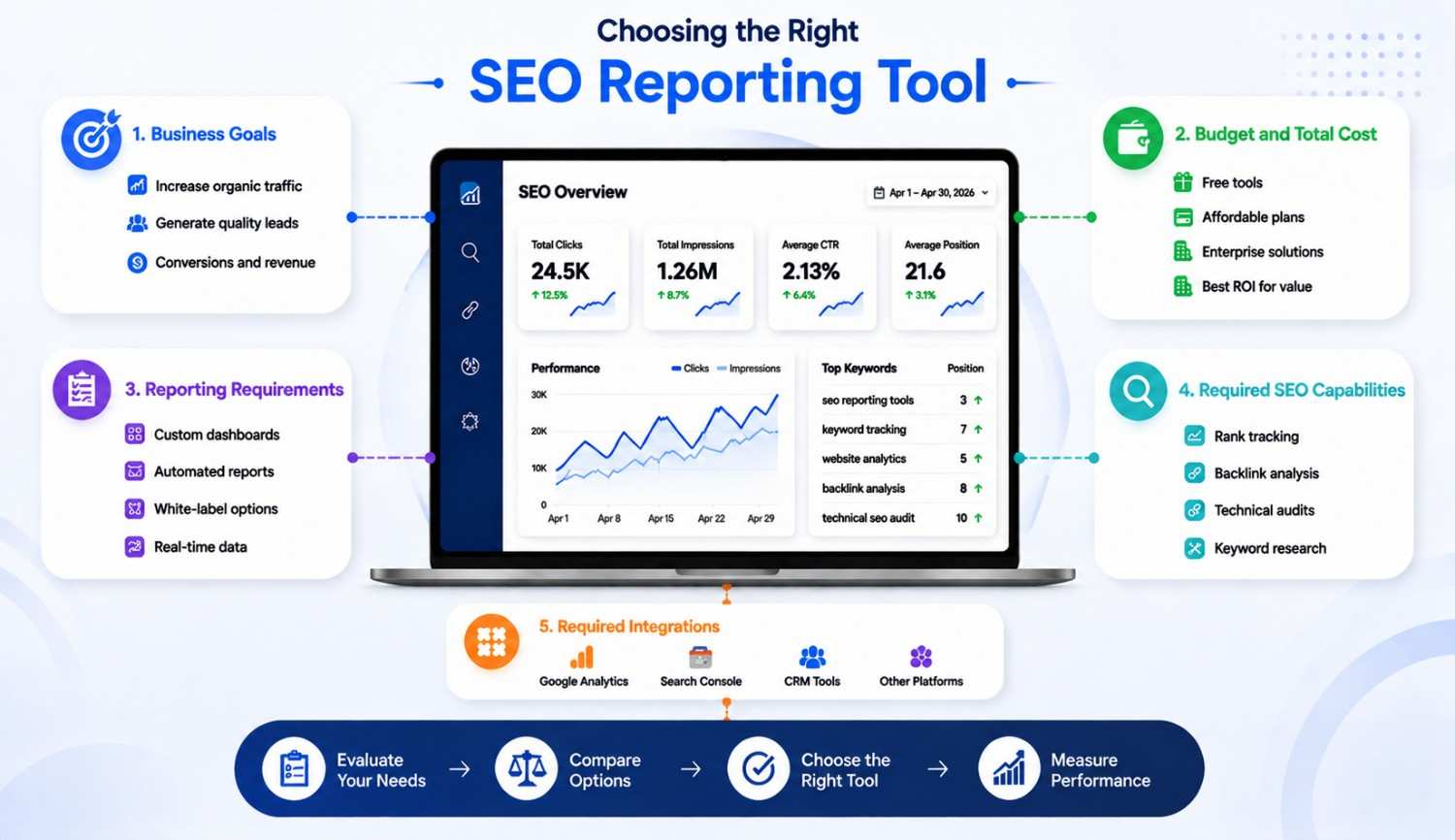
Business Goals
Choose around the decision you need to make. Rankings require position tracking, website health requires crawling, conversion analysis requires configured analytics, and AI visibility requires prompt, mention, and citation data.
Budget and Total Cost
Count users, projects, keywords, crawl credits, reports, APIs, AI add-ons, white labeling, and billing commitments, not just the advertised subscription.
Reporting Requirements
SEO specialists need diagnostic detail. Executives need trends, financial impact, and recommended actions. Clients need transparent progress, context, and consistent delivery.
Team Size and Skill Level
Small teams may prefer Moz Pro or SE Ranking. Analytics teams may value Looker Studio’s flexibility, while agencies may save time with AgencyAnalytics.
Required Integrations
Check connections with Google Search Console, GA4, advertising platforms, CRM systems, ecommerce platforms, and data warehouses. Choose the smallest reporting stack that reliably answers your business's most important SEO questions.
Which SEO Reporting Tool Should You Choose?
The right SEO reporting tool depends on your goals, budget, and reporting needs. Semrush is a strong all-in-one option, Ahrefs suits backlink and competitor research, Screaming Frog specializes in technical audits, and AgencyAnalytics focuses on automated client reporting. For a free reporting setup, combine Google Search Console, GA4, and Looker Studio.
Rather than relying on one platform, choose a reporting stack that connects search visibility, technical insights, and conversions. The goal is to turn SEO data into clear decisions that support measurable business growth.
At Zensol Technologies, we help businesses build actionable SEO reporting systems that connect performance data with practical optimization strategies.
Need a reporting setup tailored to your business? Request an SEO consultation to get started.