
A website content audit is a review of your existing pages to decide which to keep, update, merge, or remove. You use search data and a careful read-through, so each decision comes from evidence, not a guess.
Publishing more rarely fixes pages that lose rankings or get impressions without clicks. Often the faster win is improving what is already live.
This guide covers the process in seven steps, with a free spreadsheet template, a scoring method, and a checklist. It is written for small and mid-sized sites and uses free tools: Google Search Console, Google Analytics 4 (GA4), Screaming Frog, and a spreadsheet.
What Is a Website Content Audit?
A content audit looks at what visitors read: blog posts, service pages, landing pages, and guides. For each page, you check accuracy, usefulness, search performance, and fit with what the reader wants.
It differs from a technical SEO audit, which covers crawling, indexing, redirects, and site speed. It also differs from a content inventory, which is only the list of pages and is the first step of an audit. A technically clean page can still rank poorly if its content is thin or answers the wrong question.
When to Run One
- Traffic or rankings dropped and you don’t know which pages are responsible.
- Pages get impressions in Search Console but almost no clicks.
- Topics on the site overlap after years of publishing.
- Services or prices changed and old pages may be wrong.
- You are about to redesign or migrate the site.
How to Do a Website Content Audit in 7 Steps
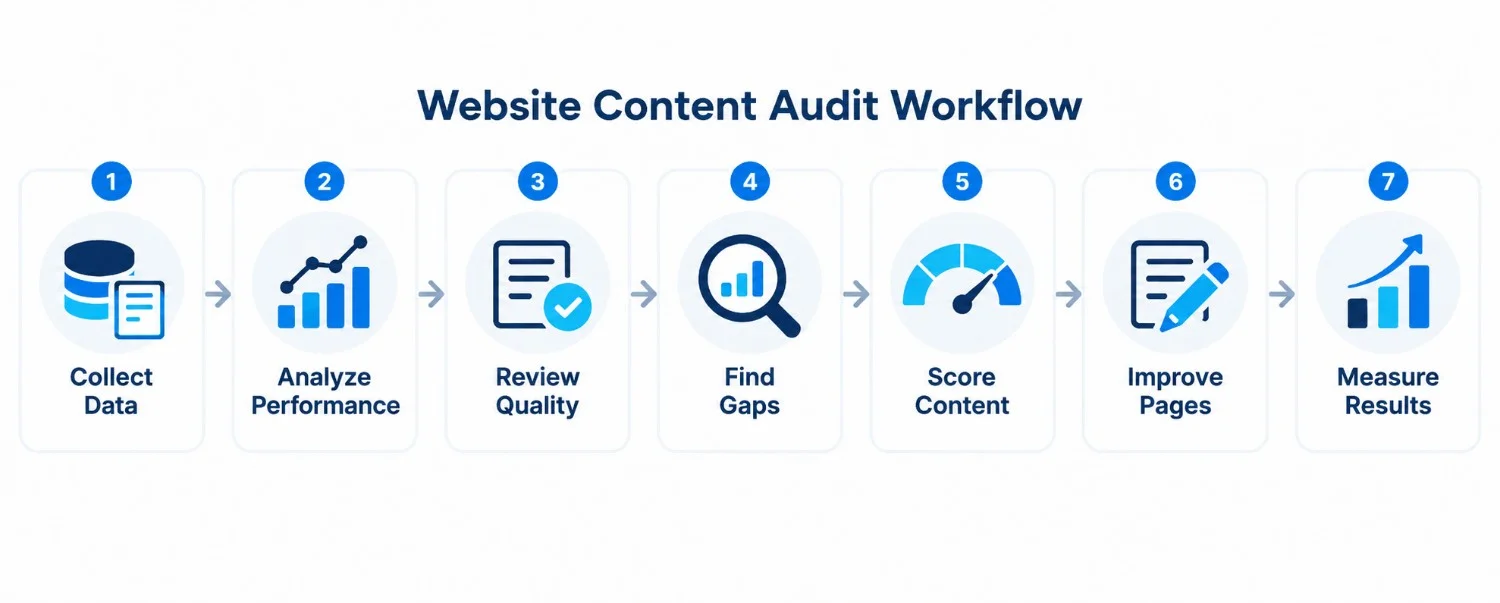
Step 1: Set One Goal and Record a Baseline
Pick the problem you are solving, such as recovering rankings, getting more leads, or fixing outdated information. The goal decides which numbers matter: query-level clicks, impressions, and positions for rankings, or GA4 conversions for leads.
Use comparable date ranges. Compare the last 28 full days with the 28 before, or three months with the previous three months for slow-moving pages. For seasonal topics, compare with the same period last year. Save these numbers before you change anything.
Step 2: Build a Content Inventory
Collect URLs from your CMS, XML sitemap, Search Console, and a crawl. To crawl with Screaming Frog, enter your domain, run the crawl, open the Internal tab, filter by HTML, and export. The free version crawls up to 500 URLs.
Compare the lists. A crawl misses orphan pages with no internal links, and a sitemap may list URLs that no longer exist.
After exporting, combine the URLs into one spreadsheet and remove duplicates. Check redirects and canonical URLs, standardize URL formats, and separate indexable content from pages outside the audit's scope. This prevents duplicate reviews and keeps your inventory accurate.
Then record each page in a spreadsheet. Our free content audit template has these columns built in, and it adds up the score and priority for you:
| Column | What to record |
|---|---|
| URL | The full address of the page |
| Page type | Blog post, service page, landing page, guide, product page |
| Main query | The search the page should rank for |
| Clicks, impressions, position | Previous and current period, from Search Console |
| Last updated | The date of the last real content change, not a small edit |
| Score (0–20) | The four ratings from Step 5, added up |
| Impact, value, effort | Ratings from Step 7 that produce the priority score |
| Action | Keep, update, expand, merge, remove, or investigate |
| Notes | The evidence behind the decision |
On a large site, start with service pages and posts that already get impressions.
Step 3: Read Search Console Data Page by Page
In Search Console, open Performance → Search results and turn on clicks, impressions, CTR, and average position. Set your comparison dates, open the Pages tab, select a URL, and switch to Queries to see its searches. Note the top five queries and compare the two periods.
| What you see | What it may mean | What to check |
|---|---|---|
| Position 1–10, many impressions, low CTR | The page ranks, but the listing may not earn clicks | Title, description, and other features on the results page |
| Position 11–20 | Some visibility, with possible room to improve | Whether the page fully answers the query, internal links, and the pages above it |
| Position 21–30 | Lower visibility | Query relevance, competing pages, and supporting links before making it a priority |
| Position 50 or lower | Weak average visibility for the query | Search intent, competing results, and internal and external links |
| Positions dropped, impressions steady | Competitors improved, or something changed on your page | Current results, recent edits, and overlapping pages |
| Impressions dropped, positions steady | Demand or the mix of queries may have changed | Seasonality and the query trend |
| Good traffic, few leads | The page may attract the wrong visitors or lack a next step | The offer, calls to action, and intent |
These are groups for investigation, not thresholds Google uses, and a low position shows weak visibility without revealing the cause. Average position also blends queries, devices, and locations, so judge a page by its individual queries.
Step 4: Compare Your Page With the Live Results
Search the page’s main query and note what kind of pages rank: guides, templates, tools, or service pages. Identify what they cover that your page may be missing.
Results vary by location, language, and device. If you serve US customers, check US results on mobile and desktop using a rank tracker or SERP tool set to that location. Treat the results as a snapshot rather than fixed rankings.
Compare the top relevant pages based on search intent, content completeness, practical examples, and supporting resources. Record useful information competitors provide that your page lacks, and determine whether those differences reflect genuine user needs.
Finally, ask whether your page fully answers the searcher's question. Use these findings to address meaningful content gaps rather than copying competitors or adding unnecessary sections.
Step 5: Score Content Quality
Rate each priority page from 0 to 5 in four areas.
| Factor | A high score means | Max |
|---|---|---|
| Search intent | The page completes the task the searcher came for | 5 |
| Accuracy | Facts and instructions are correct and current | 5 |
| Completeness | No essential step or question is missing | 5 |
| Practical use | A reader can apply the advice, with examples | 5 |
| Total | 20 |
Zero means missing or unusable, 3 means acceptable, and 5 means as good as the page needs to be. A tutorial scoring 4, 4, 2, and 2 totals 12. That is not a reason to delete it. It means the instructions need to be more complete.
Scores are judgment calls, so write your evidence in the Notes column. “Add a Search Console example showing how to read query data” is a finding. “Needs better SEO” is not. Fix serious factual errors whatever the total. Google doesn’t use this score.
Step 6: Check for Overlap and Weak Internal Links
Overlap. Filter Search Console by an important query and open the Pages tab. If two of your URLs both get impressions for it, compare them. If they serve different intents, keep both and make the difference clear. If they serve the same intent, consider merging them, and pick the surviving URL by search performance, backlinks, content quality, and intent fit, not by clicks alone.
Internal links. In Screaming Frog, check how many internal links point to each priority page. Add links from pages where the topic comes up naturally, using anchor text that describes the destination. A few relevant links beat many forced ones.
Step 7: Decide, Prioritize, and Measure
Give each page one action:
- Keep: accurate, useful, and performing as expected.
- Update: facts or steps are outdated or wrong.
- Expand: an essential explanation, example, or resource is missing.
- Merge: two pages serve the same intent. After choosing the surviving page, 301 redirect the retired URL to it.
- Remove: the page has no search, business, or reader value. Redirect only if a closely related page exists. Otherwise let it return a 404 or 410.
- Investigate: you need more evidence first.
Don’t remove a page just because it gets little traffic. It may support sales or have backlinks.
To order the work, rate impact, business value, and effort from 1 to 5, then calculate:
Priority = (Impact × Business value) ÷ Effort
A guide with impact 4, business value 5, and effort 2 scores 10. A formatting cleanup rated 2, 2, and 3 scores about 1.3. Start with the first.
Log each change with its date. Google reprocesses pages on its own schedule, so compare the same queries from Step 1 over comparable periods instead of at one fixed date. A check after about four weeks is a sensible start, not a rule. To present results, see our guide to SEO reports for clients.
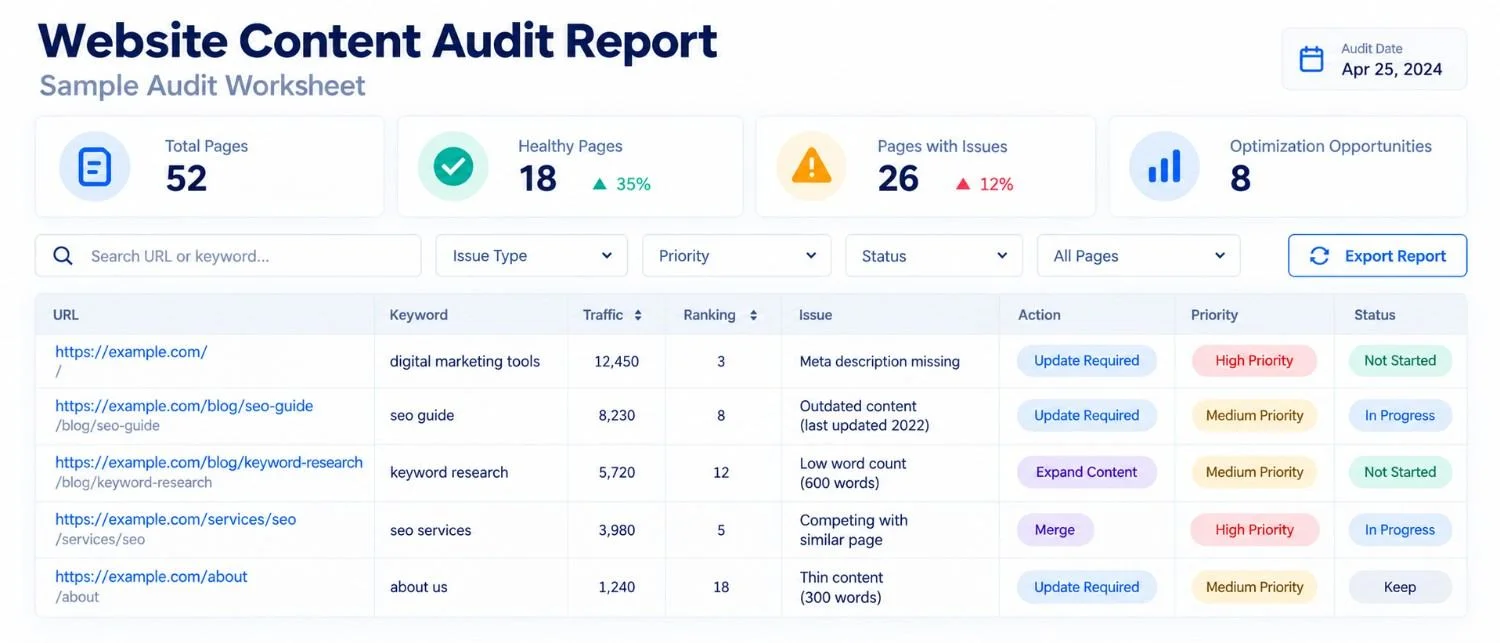
Worked Example: From Search Data to an Action
This example uses illustrative data, not actual client results.
Consider a website maintenance article compared across two three-month periods:
| Metric | Previous 3 months | Last 3 months |
|---|---|---|
| Impressions | 1,100 | 1,200 |
| Clicks | 21 | 12 |
| Average position | 22 | 28 |
Its main queries relate to website maintenance checklists and routine updates. Here's how to interpret the findings:
- Review the performance change. Impressions increased from 1,100 to 1,200, while clicks fell from 21 to 12. Average position worsened from 22 to 28. These figures indicate weaker organic performance but don't establish the exact cause.
- Compare relevant queries. Check whether the same important keywords lost positions between periods. Review search demand separately before assuming competition or content quality caused the decline.
- Identify the content gap. Suppose the article explains why website maintenance matters but lacks a practical checklist. If competing pages provide complete maintenance instructions, adding these missing steps becomes a reasonable improvement opportunity.
- Score the content. Search intent 3/5, accuracy 4/5, completeness 2/5, and practical usefulness 2/5. Total: 11/20. This indicates gaps in completeness and actionable guidance.
- Choose and measure the action. Expand the article with a maintenance checklist, testing instructions, and a completed example. With impact 4, business value 4, and effort 2, its priority score is 8. After publication, track the same relevant queries, clicks, and engagement over comparable periods.
If performance doesn't improve, revisit search intent, competing results, and internal linking rather than assuming the first diagnosis was correct.
Content Audit Tools
- Google Search Console: queries, clicks, impressions, and positions. It doesn’t judge content quality.
- GA4: engagement and conversions, with little search-query data.
- Screaming Frog: URLs, headings, and internal links. A person still has to review the content.
- Semrush or Ahrefs: keyword research, backlinks, and country-specific results. Traffic numbers are estimates.
For a small site, these tools plus a spreadsheet are enough. For ongoing tracking, see our comparison of the best SEO reporting tools.
Common Content Audit Mistakes
- Comparing periods that aren’t comparable, such as a holiday month with a normal one.
- Reading average position as a fixed ranking.
- Checking results from the wrong country or device.
- Mixing branded and non-branded queries.
- Changing everything at once, or not recording what changed and when.
How Often to Run a Content Audit
Every 6 to 12 months suits most small and mid-sized sites. Fast-changing industries may need a quarterly review of key pages. Look sooner after a sharp traffic drop or a change in services.
Content Audit Checklist
- Set one goal and a comparison period.
- Collect URLs and build the inventory.
- Review top queries and positions for each priority page.
- Compare each page with the live results for your target country and device.
- Score the four areas and note the evidence.
- Check for overlapping pages and weak internal links.
- Choose one action per page and calculate its priority.
- Log changes with dates and owners.
- Review the same queries over comparable periods.
Final Thoughts
A useful website content audit should leave you with more than a list of underperforming pages. It should show which problems are supported by evidence, which improvements deserve priority, and how progress will be measured.
Start with your most important pages, investigate their search queries, and focus on changes that genuinely help visitors. Use the audit findings to guide your next decisions rather than rewriting content simply because its traffic is low.
Zensol Global Technologies helps businesses evaluate content performance and identify practical opportunities through its SEO and website optimization services.